As more businesses move to cloud-native architectures, Kubernetes has become the most important tool for delivering and managing containerised applications. At the same time, AI, machine learning, data analytics, and high-performance computing are all making GPUs do more and more work. This mix can make things bigger and faster, but it can also make cloud costs go up quickly. This is when it is really vital to cut costs on Kubernetes. If you don’t have the necessary visibility, governance, and cost controls, Kubernetes clusters and GPU instances could eat up budgets faster than standard cloud workloads.
This blog will talk about how to save money on Kubernetes and GPU workloads in the cloud, and how cloud devops consulting and managed cloud services and FinOps methodologies may help businesses stay productive and generate money.
Why Kubernetes and GPU Workloads Raise Cloud Costs So High
Kubernetes was made to be adaptable and scalable, not to save money. The situation gets worse with GPU workloads because GPUs are expensive and generally overprovisioned. Some common reasons why cloud costs go up are:
– Pods and nodes that are excessively full
– GPU instances that are never used
– Not being able to see how much different amounts of work cost
– Putting GPU jobs on the schedule in a way that wastes time
– Kubernetes resources that aren’t being used or aren’t linked to anything else
– No one knows who is in charge of cloud cost management.
Most of the time, teams don’t realise there’s a problem with managing cloud cost managementuntil they get a huge bill each month.
What Kubernetes Cost Optimisation Does
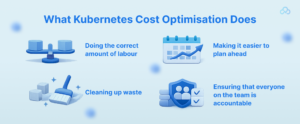
The goal of Kubernetes cost optimisation is to make sure that the amount of resources used matches the amount of work that has to be done. It makes sure that the CPU, RAM, storage, and GPUs are all used well without making the app slower. Cost optimisation doesn’t mean cutting resources without thought. Instead, it’s about:
– Doing the correct amount of labour
– Cleaning up waste
– Making it easier to plan ahead
– Ensuring that everyone on the team is accountable
Optimising Kubernetes makes it work better and costs less when done right.
Ways to Really Save Money on Kubernetes and GPUs
1. Make sure Pods and Nodes are the proper size
Finding the right size is one of the easiest and most effective ways to save on container cost optimisation.
Set the proper restrictions and needs for RAM and CPU. Don’t utilise default or inflated values for resources. Watch how things are used and make changes as needed.
2. Use Cluster Autoscaling and Node Pools
With cluster autoscaling, Kubernetes may automatically add or remove nodes depending on how much work has to be done. Here are some good ways to do things:
– Use dedicated node pools to keep the CPU and GPU tasks distinct.
– When you’re not using them, scale GPU nodes down to zero.
– Use auto scaling based on workload instead of static clusters.
3. Plan GPU workloads in a wise way
Not every task that a GPU has to undertake has to be done in real time. A lot of training jobs can be done when there aren’t a lot of people around. You can save money by:
– Setting up batch GPU jobs for periods when usage is low
– Using taints and tolerations on GPU nodes in Kubernetes
– Setting the order of workloads with priority classes
One of the most significant things you can do to achieve Kubernetes cost optimisation is to schedule your workloads smartly, especially if they require a lot of data.
4. Use Instances That Are Spot and Preemptible
Using spot or preemptible GPU instances can save you up to 70% on expenditures.
They work well for: Jobs that train
– Processing in groups
– AI workloads that can deal with mistakes
5. Use Kubernetes with FinOps
With FinOps for Kubernetes cost optimisation, engineers are in charge of the money they spend. It makes the engineering, finance, and operations teams work together. Here are some significant FinOps practices:
– Cost breakdown by application, team, or namespace
– Alerts for budget and use limits
– Regular cost reviews and optimisation sprints
6. Use tools to keep an eye on prices more clearly.
You can’t improve something if you can’t measure it. The first thing you need to do to control cloud costs is to look at them.
– Use tools that give you breakdowns of costs at the pod and namespace levels
– Measuring GPU utilisation
– Finding resources that aren’t being used
– Estimating costs
7. Lower the expenses of moving and storing data
A lot of the time, GPU workloads need enormous datasets, which could raise the costs of storage and networking. To lower these costs:
– Use the correct kind of storage
– Delete persistent volumes that you don’t need anymore.
By optimising data localisation, you can cut down on traffic between zones. When you can, cache and compress datasets. Storage optimisation is a quiet but crucial way to minimise the container cost.
How Cloud DevOps Services Can Help You Save Money
Managing a lot of Kubernetes and GPU workloads is not easy. This is when cloud DevOps services are useful. DevOps teams with a lot of experience can help with:
– Creating Kubernetes architectures that cut costs
– Putting FinOps frameworks to work
– Scaling and scheduling automatically
– Setting up notifications and keeping an eye on things
– Regular checks on cost optimisation
To speed up optimisation and avoid costly mistakes, many businesses hire DevOps consultants and managed cloud service providers.
Long-Term Benefits of Kubernetes Cost Optimisation
Companies earn more than just savings when they invest in cost optimisation:
– Cloud cost management that can be planned
– Applications that work better
– Better utilisation of resources
– Making choices more quickly
The engineering and finance departments get along quite well.
The end
Kubernetes and GPU workloads are wonderful for modern digital companies, but they need to be managed carefully to keep costs down. By leveraging FinOps for Kubernetes, smart scheduling, autoscaling, and proper sizing, businesses may save a lot of money without harming performance.
Managing cloud costs becomes a competitive advantage instead of an issue when you have the right mix of tools, processes, and cloud DevOps services. You can’t just optimise costs once. It is a journey that changes as your business goals and responsibilities change.
FAQs
1. What does it mean to get the best price for Kubernetes?
Optimising computing, memory, storage, and GPU resources in Kubernetes clusters in a way that keeps speed and reliability high is called Kubernetes cost optimisation. This lowers cloud expenses.
2. Why are GPU workloads in Kubernetes so expensive?
GPU workloads are expensive since GPUs are expensive to rent by the hour and aren’t always used enough. If you don’t set up your autoscale and schedule effectively, your cloud costs can go up a lot when your GPUs are not in use.
3. How does Kubernetes FinOps assist in cutting costs?
FinOps for Kubernetes cost optimisation holds people accountable for their money by keeping track of costs at the workload level, setting budgets, and encouraging engineering and finance teams to work together to get the most out of their money.
4. Do cloud DevOps services assist in costs?
Cloud DevOps services can help firms keep their cloud costs under control for a long time by giving them expert help with things like architectural design, monitoring, automation, and FinOps deployment.
5. What is the first thing you should do to cut down on the container cost optimisation?
At the pod and namespace levels, the first step is to look at how resources are being used and how much they cost. Getting the right information helps you make informed decisions and find methods to get better.
Do you like to read more educational content? Read our blogs at Cloudastra Technologies or contact us for business enquiry at Cloudastra Contact Us.