Within the high-speed realm of SaaS products, growth is commonly determined by feature addition. But the key element in scaling sustainably is less about addition and more about integration. The biggest UX design mistakes and user experience pitfalls are the imperceptible issues that add unnecessary friction to the process and increase mental load, taking people outside of their natural workflow. By 2026, it will be less about having a product and more about being an embedded capability.
A stable system that does not have flexibility results in silos, where information was stored in silos, and the speed at which they can be upgraded becomes too expensive. Product managers should look out for these user experience pitfalls since they could lead to customer churn. The most effective approach towards good UX strategy is to move away from superficial aspects such as design and delve into mechanics.
The Cognitive Load Crisis: Workflow Integration vs. Standalone Tools
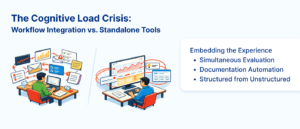
One of the most frequent UX design mistakes in SaaS development is positioning intelligence or analytics outside the user’s real-world environment. If a clinician, analyst, or manager must leave their current screen to access an insight, the friction of implementation increases, and adoption rates inevitably drop.
Embedding the Experience
Successful UI UX design for SaaS ensures that intelligence is surfaced at the point of decision-making. For example, instead of treating AI as a separate advisor, elite platforms embed clinical or business intelligence directly into the systems users already use.
- Simultaneous Evaluation: Evaluating inputs (such as writing a note or monitoring a feed) in real-time allows the model to surface outputs as work happens.
- Documentation Automation: One of the most significant ways to improve SaaS user retention is by reducing “documentation burden”.
- Structured from Unstructured: Utilizing Natural Language Processing (NLP) to pull structured data from “free-text” notes eliminates the need for manual, repetitive data entry.
By automating these tedious aspects, a platform can reduce documentation time by 20–40%, directly impacting the user’s mental load and overall efficiency.
The Interoperability Gap: Why “Silos” Are Growth Killers
SaaS growth is hindered by the lack of integration capabilities quite often. Although one can have a very efficient application, it will be useless if it doesn’t have proper connectivity with the systems already installed in the enterprise. Many UX design mistakes field occur due to the myth of replacing the old system with the new one.
The Modular Layer Approach
Professional UI UX design services now prioritize a modular architecture to handle fragmented data. By using Application Program Interfaces (APIs) to normalize, validate, and exchange data, a SaaS product can function independently of a singular data source. This decreases risk and allows the system to adopt incrementally, which is a major driver of efficiency in large, complex organizations.
|
Integration Signal |
Trend (2026) |
Impact on UX |
|
Cloud-Based Architecture |
~70% Adoption |
Enables “always-on” functionality and centralized access. |
|
Modular Integration |
Increasing Shift |
Reduces implementation friction and avoids “brittle” systems. |
|
API-First Design |
Industry Standard |
Ensures interoperability with legacy EHR or CRM platforms. |
Adaptive Friction: Solving UX Conversion Issues with Real-Time Logic
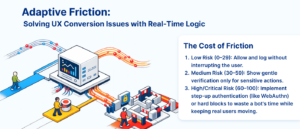
In modern web applications, the tension between security and user experience pitfalls is a primary source of UX conversion issues. Traditional static rules, such as firing controls once per login, are no longer effective against morphing botnets or sophisticated credential stuffing. Real-time risk scoring fixes this by turning a stream of signals into a rolling judgment.
The Cost of Friction
There is a cost associated with friction to the bottom line. Adaptive controls counteract this through introducing friction to high-risk groups alone, thereby maintaining a “glide path” for trusted users.
- Low Risk (0–29): Allow and log without interrupting the user.
- Medium Risk (30–59): Show gentle verification only for sensitive actions.
- High/Critical Risk (60–100): Implement step-up authentication (like WebAuthn) or hard blocks to waste a bot’s time while keeping real users moving.
In practical application, this targeted approach to security can cut credential-stuffing success by double digits while only touching roughly 2% of users with additional friction. This level of accuracy is an essential part of a contemporary UX strategy, where security improves the product without ruining the experience for the user.
Data-Driven Performance: Measuring What Matters
To avoid typical UX design mistakes, organizations need to assess the effectiveness of their processes using tangible measures rather than superficial ones. The “Calibration” of a product, which evaluates whether a particular risk or utility score is still relevant today, is crucial for its well-being.
Strategic Benchmarks for SaaS Growth
- Time to Value (TTV): How quickly a user moves from land to “Aha!”.
- Challenge Pass Rate: Monitoring if legitimate users are being blocked by over-zealous security protocols.
- Abandonment Delta: Tracking how many users drop out when challenged by a verification step.
- Model Latency: Ensuring that scoring logic (median/p95) does not introduce delays that frustrate the user.
Professional UI UX design services often utilize “shadow mode” for two to three weeks before a new workflow launch to compare suggested decisions against real outcomes, ensuring the thresholds are calibrated for both security and conversion.
Technical FAQs
1. How does “Interoperability” affect SaaS user retention?
Retention is highest when a tool becomes a “natural” part of the user’s environment. If a tool cannot share data with existing platforms (like EHRs or legacy databases), users are forced into manual workarounds, leading to abandonment.
2. Why is “Adaptive Friction” a superior UX strategy compared to static rules?
Static rules apply the same hurdles to every user, causing unnecessary UX conversion issues. Adaptive friction uses real-time signals to apply verification only when risk spikes, allowing low-risk users to remain in their flow.
3. What are the most frequent UX design mistakes regarding AI integration?
The most common error is treating AI as an “add-on” feature rather than an “embedded capability.” When AI requires users to step outside their primary workflow to gain insight, implementation friction increases and the impact of the tool is diminished.
4. How can UI UX design for SaaS reduce “Clinician or Managerial Mental Load”?
By automating documentation through speech-to-text, suggesting billing codes at the point of use, and utilizing forecasting algorithms to identify risks early, a platform can reduce the repetitive, high-stress tasks that lead to burnout.
Engineering for Resilience
Sustainable development of SaaS products is based on technical accuracy and empathy in designing. The way to go forward for entrepreneurs in building products is by steering clear of the UX design mistakes in the past like creating data silos, failing to integrate AI technology, and being static in friction. By applying UI UX design services to enhance integration, automation of processes, and configuring real-time logic, you will be able to create an important product rather than a mere useful one.
In essence, the organizations that will succeed in this environment will be the ones that integrate intelligence into everything they do. Fixing the mistakes that come with bad ux design requires nothing short of a change in mindset; one that sees software as something integrated into operations and not an add-on to the processes already in place. With an effective UX design strategy focusing on modularity and fast responses, you can solve your interoperability problems, all while dealing with any conversion problem on the user experience side of things. By collaborating with expert UI UX design services to solidify these integrations, the platform will give you everything you need to keep up with the fast pace of the industry as well. Ultimately, high-fidelity UI UX design for SaaS will secure your user retention in the long run.
Do you like to read more educational content? Read our blogs at Cloudastra Technologies or contact us for business enquiry at Cloudastra Contact Us.