AI orchestration cost in 2026 usually ranges from $30,000 to $180,000+, depending on the number of agents, tool integrations, memory layer, human review workflows, observability, and compliance requirements.
A basic 2–3 agent pipeline may cost $30,000–$60,000, while production-grade multi-agent orchestration with shared memory, tool use, human-in-the-loop review, evals, retries, and observability can cost $120,000–$180,000+. Enterprise-grade orchestration with HIPAA, SOC 2, or PCI requirements can go beyond $250,000.
Introduction
AI orchestration sounds simple from the outside.
A few agents, a few tools, one workflow, and the system completes tasks automatically.
But in real production systems, AI orchestration is more than connecting multiple prompts together. It requires agent coordination, task routing, tool access, shared memory, retries, logging, evaluation, human review, permissions, and monitoring.
That is why AI orchestration pricing can vary so much.
One project may only need a small sequential agent pipeline. Another may need a full multi-agent system where agents work in parallel, use external tools, pass context, call APIs, escalate risky outputs, and maintain audit trails.
Both are called AI orchestration, but the cost is completely different.
This guide explains what AI orchestration costs in 2026, what drives the price up, how framework choice affects cost, what monthly run costs look like, and how companies can avoid the most common budgeting mistakes.
What Is AI Orchestration?
AI orchestration is the process of coordinating multiple AI agents, tools, memory layers, workflows, and human review points so they can complete complex tasks together.
It is different from a simple chatbot.
A chatbot usually responds to user questions. AI orchestration manages multi-step workflows.
It is also different from basic workflow automation.
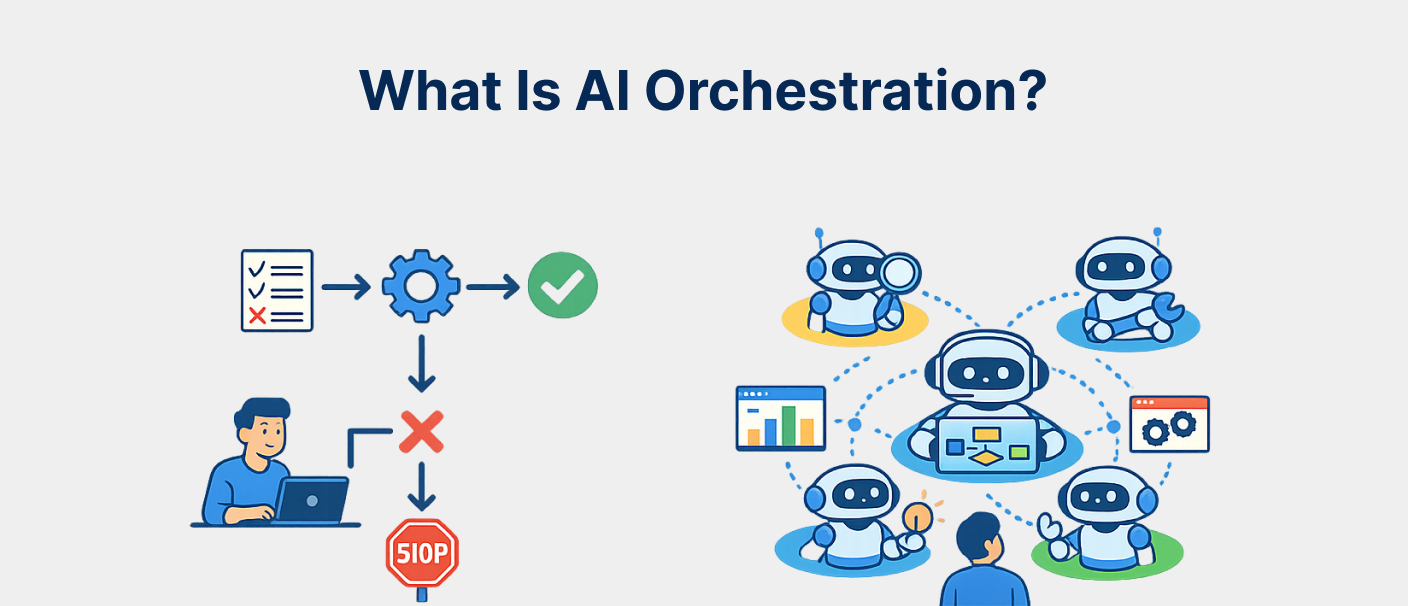
AI orchestration coordinates multiple specialised agents, tools and workflows through a central control layer.
Workflow automation follows fixed if-then logic. AI orchestration allows LLM-powered agents to reason, choose next steps, use tools, and adapt to inputs that may not follow a fixed path.
AI orchestration may include:
- Multiple AI agents
- Task planning
- Tool use
- Shared memory
- Retrieval systems
- Human-in-the-loop review
- Agent handoffs
- Retry logic
- Evaluation pipelines
- Observability
- Compliance logging
- Production monitoring
In simple terms, AI orchestration helps businesses move from one AI assistant to a coordinated AI system.
Why AI Orchestration Costs More Than a Simple AI Agent
AI orchestration costs more because the expensive part is not just the agent.
The expensive part is coordination.
A single AI agent may answer questions, summarize documents, or complete one workflow. But a multi-agent orchestration system must manage how agents communicate, when they act, which tools they can use, what happens when they fail, and when humans should approve decisions.
For example, a simple support chatbot may only need one model call and one knowledge base.
A multi-agent support automation system may need:
- Intake agent
- Classification agent
- Knowledge retrieval agent
- Action agent
- Escalation agent
- QA agent
- Human review workflow
- Ticketing system integration
- Conversation logs
- Monitoring
- Evaluation pipeline
This is why AI orchestration development has a wider cost range.
More agents, more tools, more risk, and more reliability requirements all increase the build cost.
AI Orchestration Cost Bands in 2026
AI orchestration cost depends on complexity. Here are the practical cost bands.
1. Basic 2–3 Agent Sequential Pipeline
Typical build cost: $30,000 – $60,000
Monthly run cost: $1,500 – $4,000
Timeline: 4 – 7 weeks
This is the simplest orchestration setup.
It usually includes two or three agents working in a fixed sequence.
For example:
- Research agent collects information
- Writer agent creates output
- Reviewer agent checks quality
Or:
- Intake agent understands request
- Retrieval agent pulls context
- Response agent generates answer
This tier is useful for standard workflows where the steps are predictable.
It usually includes basic evaluation, limited tool use, and simple orchestration logic.
2. Multi-Agent System With Shared Memory and Tool Use
Typical build cost: $60,000 – $120,000
Monthly run cost: $3,000 – $9,000
Timeline: 8 – 12 weeks
This tier is more advanced.
It includes multiple agents that share context, use tools, and coordinate across a larger workflow.
Examples include:
- AI research workflow
- AI sales operations workflow
- AI support automation
- AI document processing workflow
- Internal AI operations assistant
- Multi-step customer service agent
This type of build may include:
- Shared memory
- API integrations
- Tool calling
- Agent handoffs
- Workflow routing
- Basic observability
- Testing and evaluation
- Human review for selected actions
This tier is common for companies that want AI to do real operational work, not just generate answers.
3. Parallel and Hierarchical Agent Graph
Typical build cost: $90,000 – $150,000
Monthly run cost: $5,000 – $12,000
Timeline: 10 – 16 weeks
A parallel or hierarchical agent graph is used when multiple agents need to work at the same time or report to a coordinator agent.
For example:
- One agent researches competitors
- One agent analyzes customer data
- One agent checks internal documents
- One agent prepares recommendations
- A manager agent combines the output
This is more complex because the system needs:
- Dependency handling
- State management
- Conflict resolution
- Parallel execution
- Result aggregation
- Quality scoring
- Retry logic
This tier is useful for complex business workflows where speed and coordination matter.
4. Production-Grade Orchestration With HITL, Evals, and Observability
Typical build cost: $120,000 – $180,000
Monthly run cost: $8,000 – $15,000
Timeline: 14 – 20 weeks
Production-grade AI orchestration is built for real users, real actions, and real business risk.
This tier includes:
- Human-in-the-loop approval
- Evaluation framework
- Prompt regression tests
- Agent performance tracking
- Retry policies
- Observability dashboards
- Logging
- Tool permissions
- Failure handling
- Monitoring
- Security review
- Production deployment
This is the right tier when the AI system can affect customers, revenue, compliance, operations, or sensitive business workflows.
If the system can take meaningful actions, it needs stronger control.
5. Enterprise Compliance-Grade AI Orchestration
Typical build cost: $180,000 – $250,000+
Monthly run cost: $12,000 – $25,000
Timeline: 18 – 26 weeks
Enterprise compliance-grade orchestration is needed when the system operates in regulated environments.
This may include:
- Healthcare
- Fintech
- Insurance
- Payments
- Banking
- Legal
- Enterprise security
- Customer data workflows
This tier may require:
- HIPAA controls
- SOC 2 controls
- PCI controls
- Audit logging
- Data residency
- Encryption at rest and in transit
- PII redaction
- BAA-eligible LLM endpoints
- Manual review queues
- Change-management documentation
- Access control
- Compliance evidence
This is the highest-cost tier because the system must be safe, explainable, auditable, and production-ready.
Framework Choice and Its Cost Impact
Framework choice can change AI orchestration pricing by 10–40%.
The right framework depends on the orchestration pattern.
CrewAI
CrewAI is often a good fit for sequential or role-based agent crews.
It is usually cost-efficient when agents have clearly defined responsibilities and workflows are mostly predictable.
Best for:
- Sequential workflows
- Role-based delegation
- Research and writing workflows
- Simple hierarchical crews
Cost impact: baseline.
LangGraph
LangGraph is useful when the workflow needs explicit state management, branching, and graph-based execution.
It may add 10–15% to the build cost because it requires more planning around state and transitions.
Best for:
- Complex branching
- State-machine workflows
- Multi-step decisions
- Human-in-loop checkpoints
- Production-grade agent systems
AG2
AG2, the successor to AutoGen patterns, is useful for multi-agent conversation and collaboration workflows.
It works well when agents need to debate, negotiate, review, or vote.
Best for:
- Multi-agent conversations
- Group chat patterns
- Agent review workflows
- Collaborative reasoning
Cost impact: around 5–10% above baseline depending on use case.
Pydantic AI
Pydantic AI is useful for type-safe agents and smaller orchestration graphs where structured outputs matter.
Best for:
- Type-safe agent workflows
- Smaller graphs
- Structured output systems
- Reliable response validation
Cost impact: slightly below or close to baseline for smaller builds.
Custom Framework Builds
Custom orchestration using raw LangChain primitives or hand-built logic is the most expensive option.
It may add 25–40% to the cost because the team has to wire more infrastructure manually.
Custom builds make sense only when existing frameworks do not fit the workflow.
What Drives AI Orchestration Cost Up
Agent Count
Every new specialist agent adds design, prompt logic, tool wiring, evaluation cases, and integration testing.
Adding agents can increase build cost by around $8,000–$15,000 per agent, depending on complexity.
More agents are useful only when they create better output or parallel execution. Adding agents without a clear role increases cost without improving quality.
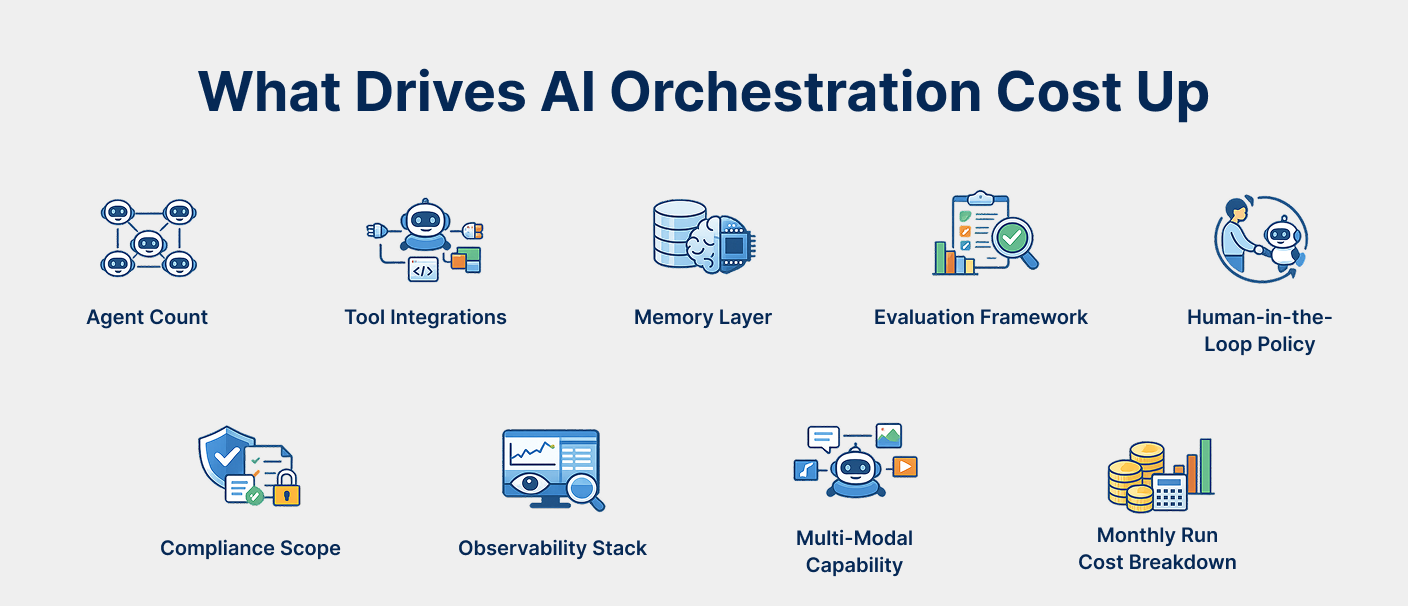
Tool Integrations
Tool integrations increase cost because agents need safe and reliable access to external systems.
Examples include:
- CRM
- Calendar
- Database
- Payment system
- Search tool
- Code execution
- Ticketing platform
- Slack
- Internal APIs
The first few integrations may be manageable. Five or more external tools can add $10,000–$25,000 or more depending on access controls and failure handling.
Memory Layer
Basic in-context memory is cheaper.
A more advanced memory layer using Redis, Postgres, vector storage, or hybrid memory costs more because it requires data modeling, retention policy, retrieval tuning, and privacy controls.
Moving to a production memory layer may add $8,000–$20,000.
Evaluation Framework
Evaluation is one of the most important cost items.
A proper eval framework may include:
- Golden-set tests
- Expected output checks
- Adversarial cases
- Regression tests
- Drift detection
- Accuracy scoring
- Human review samples
This can add $15,000–$30,000, but skipping it is risky.
Without evaluation, orchestration may work in week one and degrade by month three.
Human-in-the-Loop Policy
Human-in-the-loop workflows are needed when the AI system can make high-impact decisions or take risky actions.
This may include:
- Escalation rules
- Review queues
- Approval screens
- Manual override
- Risk-based routing
- Reviewer notes
- Action logs
This can add $12,000–$25,000 depending on review complexity.
Compliance Scope
Compliance increases cost because the system needs stronger controls.
For example:
- SOC 2 may add around 25% to project cost
- HIPAA may add $25,000–$80,000 depending on scope
- PCI can add more if payment data is involved
Compliance requires logging, encryption, data handling, access control, documentation, and security validation.
Observability Stack
Production AI orchestration needs observability.
Teams need to know:
- Which agent ran
- Which model was used
- Which tool was called
- What failed
- Why retries happened
- What output was produced
- How much it cost
- Whether quality is drifting
Integrating tools like LangSmith, Langfuse, Helicone, or custom dashboards can add $8,000–$15,000.
Multi-Modal Capability
Adding voice, vision, or structured-output capability increases cost.
Multi-modal systems may require extra handling for:
- Images
- Voice
- Audio latency
- Transcription
- Visual reasoning
- Document layout
- Structured extraction
- Real-time interaction
This may add $15,000–$40,000 depending on depth.
Monthly Run Cost Breakdown
The build cost is only one part of AI orchestration pricing.
After launch, teams also need to budget for monthly run costs.
Typical monthly costs may include:
- LLM API spend
- Vector database hosting
- Memory layer
- Observability tools
- Tool API usage
- Orchestrator backend hosting
- Monitoring
- Retention engineering
For light usage, monthly run cost may be around $2,500–$5,000.
For production scale, monthly run cost may reach $8,000–$25,000, depending on traffic and workflow complexity.
The biggest monthly cost is usually LLM API usage.
It may represent 40–60% of the monthly run cost.
Teams can reduce this with:
- Prompt caching
- Model routing
- Smaller models for simple tasks
- Premium models only for complex tasks
- Response length limits
- Better tool call control
- Retrieval optimization
Monthly run cost should be planned before launch, not discovered after the first invoice.
DIY vs Agency vs Productized Sprint
DIY In-House Build
DIY makes sense when the team already has experienced AI engineers.
It gives the company deeper internal ownership, but it may take longer if the team is learning orchestration while building.
Typical timeline: 12–20 weeks.
Best for companies with a strong AI engineering bench.
Agency or Custom Build Partner
An agency or experienced AI engineering partner makes sense when the company does not have internal AI orchestration expertise.
This path is often faster because the partner already knows framework trade-offs, eval patterns, deployment risks, and observability needs.
Typical cost: $60,000–$180,000
Typical timeline: 8–16 weeks
The trade-off is that internal teams need proper handover to avoid knowledge debt.
Productized Sprint
A productized sprint works best for standard patterns.
Examples include:
- Support deflection agent
- Document Q&A agent
- Research automation agent
- Basic internal workflow assistant
Typical cost: $30,000–$60,000
Typical timeline: 4–7 weeks
This is usually the fastest and cheapest option, but only when the workflow fits a known pattern.
AI Growth Partner or Retainer Model
A retainer model is useful when AI orchestration is not a one-time build but part of long-term business operations.
This may include:
- Continuous monitoring
- Prompt improvement
- Evaluation expansion
- Retrieval tuning
- New integrations
- Workflow improvements
- Performance reporting
Typical cost: $8,000–$25,000 per month depending on scope.
Common AI Orchestration Cost Mistakes
Skipping the Eval Pipeline
Skipping evaluation may save money upfront, but it creates larger problems later.
Eval-less orchestration systems may work during demos but fail when inputs change, users behave differently, or workflows grow.
Budget evaluation from day one.
Choosing the Wrong Framework
Framework choice should follow workflow pattern.
Do not force CrewAI into a complex state-machine workflow. Do not overbuild with LangGraph when a simple sequential pipeline is enough.
Wrong framework choice can increase cost by 25–40%.
Under-Budgeting Observability
Without observability, debugging production AI orchestration becomes slow and expensive.
Teams need visibility into agent calls, tool usage, failures, retries, costs, and output quality.
Treating Monthly Run Cost as Fixed
Monthly run cost can vary widely based on model usage, prompt caching, tool calls, and response size.
Without optimization, a $5,000 monthly run cost can become $15,000.
No Retention Engineering Budget
AI orchestration quality can decay over time.
Prompts, models, data, retrieval behavior, and user needs change.
Teams should plan retention engineering for eval-suite updates, prompt regression testing, retrieval tuning, and drift monitoring.
For compliance-focused AI workflows, businesses can use Cloudastra’s RiskIntel to support automated screening, continuous monitoring and audit-ready compliance decisions.
How Cloudastra Helps With AI Orchestration Development
Cloudastra helps companies scope, design, build, and operate AI orchestration systems with clear pricing and production-focused engineering.
Cloudastra can help with:
- AI orchestration audit
- Framework selection
- AI orchestration MVP
- Multi-agent orchestration
- Agent workflow design
- Tool integration
- Memory layer setup
- Human-in-the-loop workflows
- Evaluation pipeline
- Observability setup
- Compliance-ready orchestration
- Retained orchestration operations
Fintech teams can also learn how to reduce repetitive screening and onboarding delays in this detailed guide to AML compliance automation for fintech
Cloudastra’s AI orchestration audit helps teams understand which framework fits, what architecture is required, and what the build should actually cost before committing to a full project.
For teams that already know the workflow, Cloudastra can build a 2–3 agent MVP, a production-grade multi-agent system, or retained orchestration operations depending on the business need.
The goal is not to overbuild. The goal is to choose the smallest orchestration system that can reliably deliver the business outcome.
Who Should Read This Guide?
This guide is useful for:
- Startup founders
- SaaS companies
- Product managers
- CTOs
- AI product teams
- Operations leaders
- Enterprise innovation teams
- Companies comparing orchestration frameworks
- Teams building AI agents
- Businesses planning multi-agent workflows
- Companies choosing between DIY and agency builds
- Teams budgeting for production AI systems
It is especially useful for companies that are moving beyond single AI assistants and want to build reliable multi-agent orchestration for real business workflows.
Want to explore more practical insights on AI development, automation, and conversational AI? Read more blogs at Cloudastra Technologies or contact us for business enquiries through Cloudastra Contact Us.
FAQs
1. How much does AI orchestration cost in 2026?
AI orchestration cost in 2026 usually ranges from $30,000 to $180,000+. Basic 2–3 agent pipelines cost $30,000–$60,000, while production-grade systems with evals, observability, and human review can cost $120,000–$180,000+.
2. What is the difference between AI orchestration and workflow automation?
Workflow automation follows fixed if-then logic. AI orchestration uses AI agents that can reason, use tools, branch across steps, and adapt to different inputs.
3. What is multi-agent orchestration?
Multi-agent orchestration is a system where multiple specialized AI agents work together, share context, use tools, and complete complex tasks under an orchestration layer.
4. Which AI orchestration framework should I use?
CrewAI is useful for sequential or role-based workflows. LangGraph is better for state-machine workflows and complex branching. AG2 works well for multi-agent conversation patterns. Pydantic AI is useful for smaller type-safe agent workflows.
5. How long does it take to build AI orchestration?
A basic 2–3 agent pipeline may take 4–7 weeks. A multi-agent system with memory and tools may take 8–12 weeks. Production-grade orchestration with evals and observability may take 14–20 weeks.
6. What ongoing costs should I budget after launch?
Ongoing costs include LLM API usage, vector database hosting, memory layer, observability tools, tool API usage, backend hosting, monitoring, and retention engineering.
7. What is the hidden cost most founders miss?
The hidden cost is retention engineering. After launch, teams need to maintain evals, retune retrieval, monitor drift, improve prompts, and update workflows as the system changes.
8. Can AI orchestration be HIPAA or SOC 2 compliant?
Yes, but compliance-ready orchestration requires audit logging, data controls, encryption, BAA-eligible endpoints where required, access controls, manual review queues, and formal change-management documentation.